
Every active AI agent can get its own local number to take calls on. The number is included in the Managed package or in the agent licence, so you don't confirm a price when booking. Your company has to be verified first; only phone numbers from the USA need no verification. How that works is explained in Verifying your company for phone numbers.
The overview
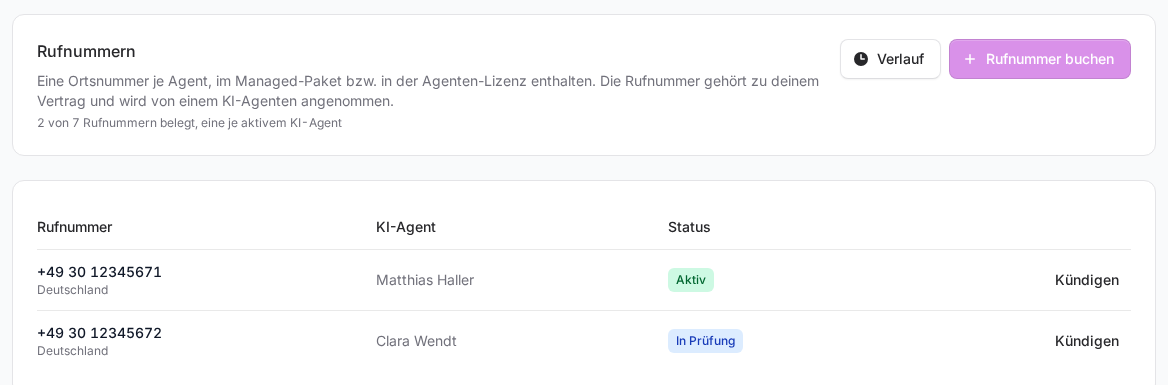
You find your numbers in the sidebar under FlowAgents, Telephony, Phone numbers tab. The top shows how many numbers are in use, for example "2 of 3 phone numbers in use, one per active AI agent". Below that you see each number with the AI agent that answers it and its Status. The booked number also appears in the AI agents list in the Phone number column.
As the owner or a co-owner you also see your team's Minute pool for the current billing period above the tabs.
Booking a phone number
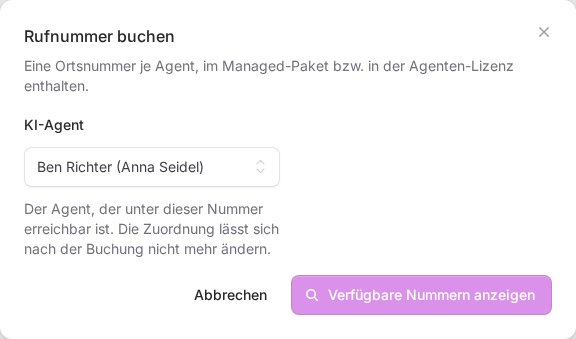
- Click Book a phone number.
- Under AI agent, choose the agent that should be reachable under the number. Only active agents that don't have a number yet are offered. If your team has several agents, the person the agent belongs to is shown in brackets.
- If your team is open for several countries, also choose the Country. Outside Germany you can enter an area code under Area code (optional). If you leave the field empty, we search every local network.
- Click Show available numbers and pick a number from the list. If you don't like any of them, Other numbers gets you new suggestions.
- Confirm with Book phone number.
In Germany you only get numbers from the local network of your verified company address. If no number is free there right now, the dialog tells you. We are then informed automatically and look for supply.
Important: You choose the agent when booking, and the number stays with it afterwards. If a number should move to another agent, get in touch with us.
What the status means
- Being booked: The booking is still being confirmed. The status updates by itself.
- In review: The number is booked and in service, and the telephony provider is still matching it against your verification.
- Active: All done.
- Not compliant: The number was flagged in the review. The person who booked it and the owner of the team get an e-mail about it. If this stays so, the number may be withdrawn.
- Cancelled: The number stays in service until the date shown.
- Reserved: The number is out of service, but still held for you until the date shown.
- Booking failed: No purchase was made. You can try again.
Cancelling or taking back a number
- Click Cancel in the number's row and confirm in the dialog.
- The number stays in service until the last day of the running contract month. Until then you can undo the cancellation with Withdraw cancellation.
- After that it stays reserved for 30 days. During that time Take back returns it to the agent that answered it last, as long as that agent is active and has no other number. For another agent, get in touch with us.
- Then the number is released for good and cannot be restored.
If you delete an agent or it is no longer active, its number leaves service at once and is also reserved for 30 days. If your FlowAgents contract is cancelled, the numbers end with the contract as well.
History shows who booked, cancelled or took back a number and when.
When someone calls
When someone calls a number, the assigned agent answers. If the call comes from one of the own phone numbers stored by the person who booked the number, the agent recognises them and treats the call like a conversation from the dashboard (see Adding your own phone number). Every other caller, including callers with a withheld number, counts as an outside caller: the agent tells them in its greeting that they are talking to a digital assistant and takes down their request. The person the agent belongs to in the org chart then gets an e-mail with the request and a callback number. Without an assignment the e-mail goes to the owner, more on this in The phone e-mails. Duration and transcript are in the agent's call history, see Reading the call history.
Every answered call counts toward your team's minute pool, see Understanding your plan and minute pool.
If something goes wrong
- You see "Verify your company first" instead of the overview: The verification is still missing or has not been approved.
- The button is greyed out: The text below the heading tells you why. Usually every active agent already has a number. An agent that is only planned in the org chart gets a number once it is active. If it says that no country is open for phone numbers, get in touch with us.
- Callers hear a busy signal: The agent is not ready right now, or the contract is not active. The person who booked the number gets an e-mail about it. If that person no longer has access to the AI agents, the e-mail goes to the owner. After a very large number of calls within one hour, further callers also hear a busy signal for a while.
- Members without owner rights only book numbers for their own agents and only see those numbers. Cancelling, taking back and the history are only available to the owner and co-owners, see Who can do what in FlowAgents?