
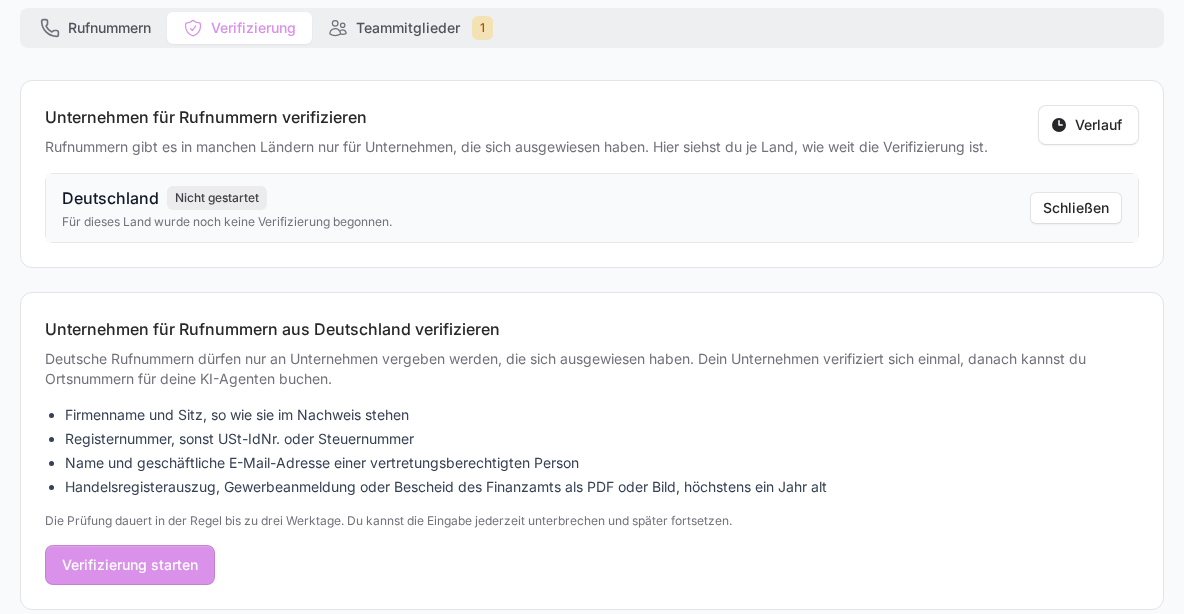
German local numbers may only be given to companies whose identity and address have been checked. That is why your company identifies itself once before you can book phone numbers for your AI agents. You do this in a few minutes right in FlowAgents, and the review itself usually takes up to three business days.
The verification is handled by the owner or a co-owner of the team. Members don't see the Verification tab. In the Phone numbers tab they only see a note that the verification is still pending and is taken care of by the owner or a co-owner.
What you need
- Company name and seat, as written in the proof
- Register number, otherwise VAT ID or tax number
- Name and business e-mail address of an authorised representative
- Commercial register excerpt, trade licence or tax office notice as PDF or image, at most one year old
Starting the verification
- In the sidebar under FlowAgents, open Telephony and switch to the Verification tab.
- Click Start in the Germany row.
- Read the short overview and click Start verification.
As long as no verification has been approved, the Phone numbers tab also shows the Verify your company first card with a Start verification button. It takes you straight to the overview for Germany.
Some fields are already filled in with your team's company details and your name. That is only a suggestion: check everything against your proof, because differences are the most common reason for a rejection.
The five steps
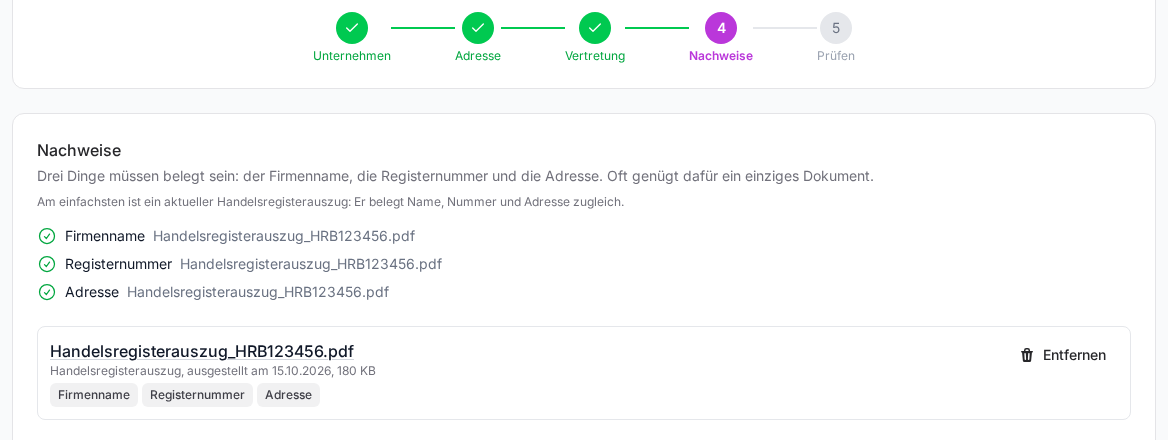
The top of the page shows where you are. Save and continue saves each step, so you can stop at any time and pick up later with Continue. Another co-owner can take over, too.
- Company: Answer the question Is your company entered in the commercial register? If you choose Yes, enter the Commercial register number (for example HRB 123456). If you choose No, pick the VAT identification number or the tax number under Kind of number. Then add the Company name with its legal form and the Website. If there is no website, the address of a social media profile is enough.
- Address: Street and house number, Postal code, Place and State. A post office box is not accepted. We suggest the Area code based on the place; if the suggestion is wrong, enter it yourself. It matters: your phone numbers will later get the area code of this local network.
- Representative: First name, last name and business e-mail address of a person who may act for the company, such as the managing director. No ID is needed. Under Note for the review you can optionally explain something, for example a differing spelling.
- Proofs: Company name, Register number and Address have to be proven. Often a single document is enough, since a current commercial register excerpt proves everything at once. Choose the Kind of document, the Date of issue and, under This document proves, what it stands for. Upload the file (PDF, JPG or PNG, at most 5 MB, complete and without redactions) and click Upload. A new proof replaces the previous one for the same detail.
- Review: Under Review and submit you see all details once more. Confirm both points and click Submit for review. The privacy notice below names the telephony provider your details are sent to for the review.
After you submit
The status changes to Being submitted and shortly after to In review. Until there is a result the details can't be changed, but you can read them at any time with View. We inform the person who submitted and the owner of the team of the result by e-mail, and a notice also appears in your notifications. With Check now you can retrieve the state yourself, a few times per hour.
- Approved: Your company is verified. Nothing is booked yet. How to book numbers for your agents now is explained in Booking a phone number for an AI agent.
- Rejected: The reasons are shown right at the proofs concerned. Click Correct in the country overview, fix the points and submit again. All reasons and their solutions are listed in Verification rejected: understanding the reasons and correcting it.
- Update needed: The requirements for phone numbers have changed. Click Correct, go through the steps by the stated deadline and submit again. Your phone numbers keep running unchanged until then.
Other countries
We decide for your contract which countries your team can book phone numbers from. Germany is the default. If your team is open for more countries, every country that requires a verification has its own row in the country overview and its own verification.
- Brazil: Phone numbers are only available to companies registered in Brazil. You need the company name and seat in Brazil, the company's CNPJ, an authorised representative and an excerpt from the commercial register (Junta Comercial). If the Brazilian address is not in the excerpt, also upload a proof of address that is no older than three months.
- USA: No verification is needed here. Below the overview you then see "No verification is needed for phone numbers from these countries".
If we have set up an approval for another country for your company, the Approvals for other countries card appears below the overview with the country, the number type and the status. There is nothing more for you to do.
Good to know
- Sometimes the details come back after a pre-check. You then see which detail is missing or doesn't match and can correct it right away.
- A draft that has never been submitted can be deleted completely with Discard draft. The details and proofs are then gone, and the country is back to Not started.
- History shows who changed what in the verification and when.
- An e-mail address at a free mail provider, a domain that doesn't match the website, or a proof older than one year doesn't block submitting, but leads to queries or rejections more often.
- Once the contract for your AI agents has ended, a verification can no longer be submitted.