
The Plan page shows at a glance which package your team has, what you pay per month, what the package includes and how many phone minutes have been used in the current billing period. The page is for viewing only, there's nothing you need to change here.
Who sees the page
You'll find it in the sidebar under FlowAgents as Plan. It's reserved for the owner, co-owners and people with full access to FlowAgents, and the item only appears once your team has a FlowAgents contract. Members don't see it.
The three tiles at the top
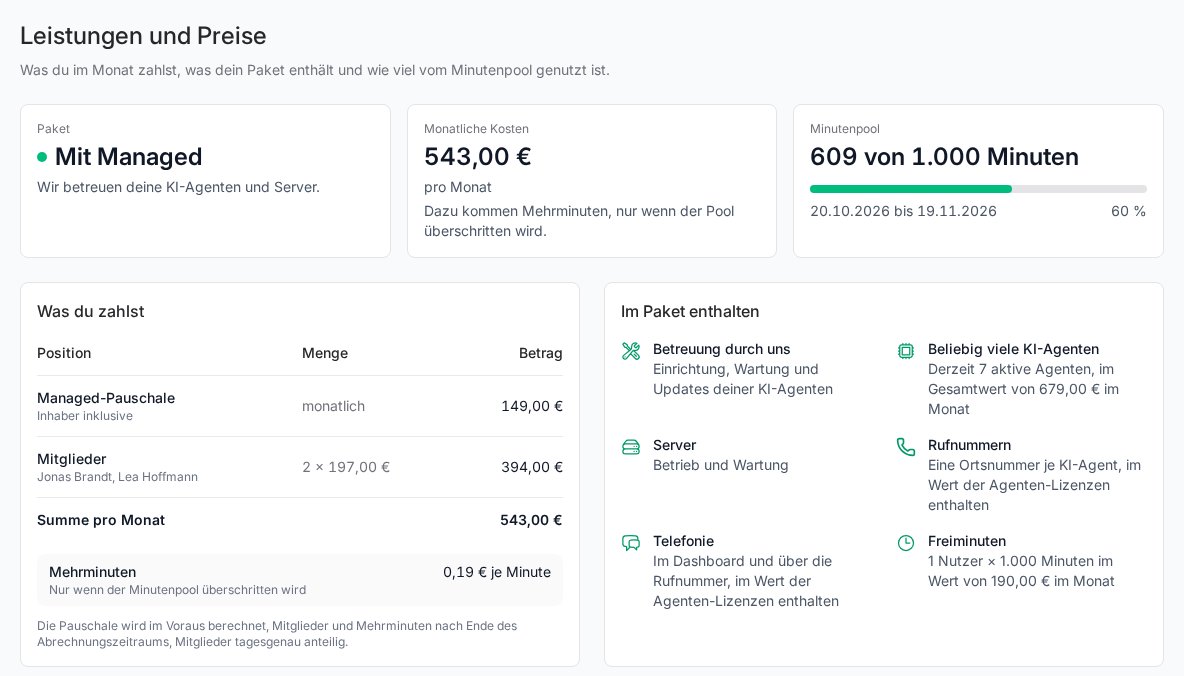
- Package: With Managed means we look after your AI agents and servers. Without Managed means you pay one licence per active AI agent, which also covers servers, operation and maintenance. If a change is coming up, you see it here, for example "Managed ends on …" or "Managed starts again on …". If the contract is cancelled, the date appears here, see When your FlowAgents contract ends.
- Monthly costs: the total you pay every month. Extra minutes are only added when the minute pool is exceeded. If extra minutes are free in your contract, this tile says so too.
- Minute pool: how many of how many minutes have been used in the current billing period, with a bar, the period and a percentage. From 80 % the bar turns amber, from 100 % red.
What you pay
The What you pay table breaks down the monthly costs:
- With Managed: the Managed flat fee (the owner is included) and the Members with access to the AI agents, each listed by name. Open invitations already count and are marked as "invited".
- Without Managed: the Agent licences per active AI agent. Servers have no line of their own, they're included in the licences. Planned agents cost nothing.
If an item is free in your contract, it shows Included instead of an amount. Below that come the Total per month and, separately, the price for Extra minutes. A short note explains what's billed in advance and what's billed after the end of the billing period. Members and licences are prorated to the day. If amounts from ended periods are still waiting for the next invoice, the page lists them below the table.
The page itself shows every amount. What counts is always the values it shows for your contract.
What the package includes
With Managed, Included in your package shows everything the flat fee covers: Looked after by us, Any number of AI agents, Servers, Phone numbers (one local number per AI agent), Telephony in the dashboard and over the phone number, and the Free minutes. Where it makes sense, the value is shown next to it, so you can see what you would otherwise pay.
Without Managed, the block is called Included in every agent licence: one phone number, telephony and free minutes per agent, plus Servers, operation and maintenance. There's no separate amount for the servers, the licence already covers them.
You don't switch between with and without Managed yourself on this page. Write to us if you'd like to switch. The change then applies from a new billing period.
How the minute pool works
All of your team's free minutes go into one shared pool:
- With Managed, every user, meaning the owner and every member with access, brings a fixed number of free minutes per month.
- Without Managed, every agent licence brings its free minutes.
The free minutes always apply for the full month, even if someone joins in the middle of the billing period. Calls in the browser count towards the pool just like calls to an agent's phone number. Started minutes count, and every answered call counts at least one minute. Refused calls don't count.
Once the pool is used up, calls simply carry on. The minutes beyond it are extra minutes and are billed with the next invoice after the period ends. At 80 % and at 100 %, the owner and co-owners get an email and a notification. If you belong to several teams, the button in the email opens the plan of the right team directly.
Minute pool in detail
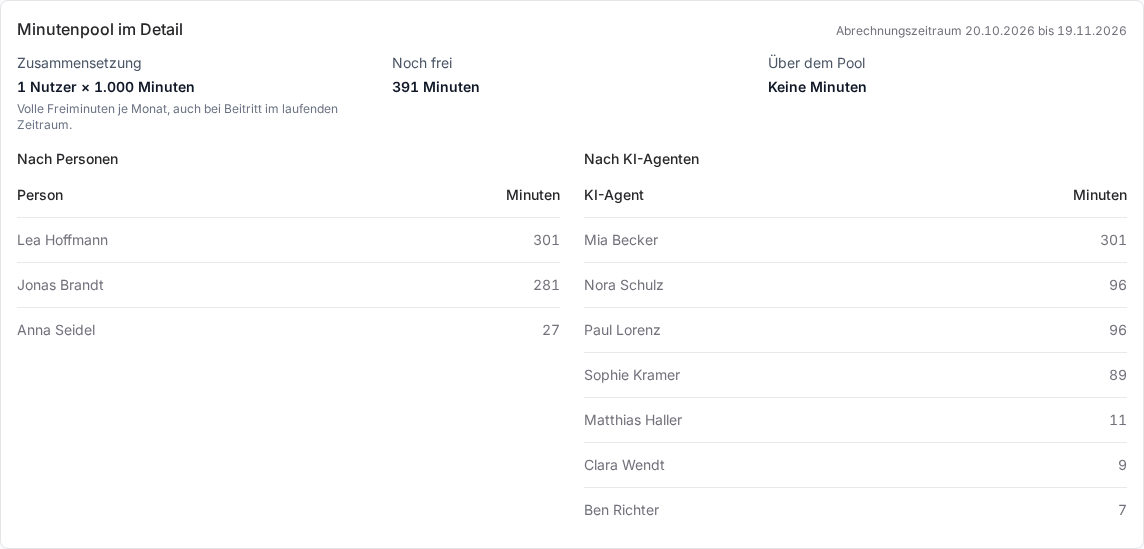
At the very bottom you'll find, for the current Billing period:
- Composition: how the pool is made up, for example users times minutes.
- Still free: the minutes left until the end of the period.
- Above the pool: extra minutes already used and their amount so far.
- By person and By AI agent: who spent how many minutes on the phone and with which agent.
While a call is running, the Minute pool tile shows Call in progress. Its minutes already count provisionally.
Good to know
- As an owner, co-owner or with full access, you also see a compact version of the minute pool at the top of the Telephony page.
- People who have left the team appear in the breakdown as Former member, deleted agents as Deleted agent.
- Who counts as a member with Managed is decided by access to FlowAgents, see Who can do what in FlowAgents?
- How phone numbers for your agents work is explained in Book a phone number for an AI agent.