
Every call with an AI agent ends up in its call history, whether you called it in the browser or someone from outside dialled its phone number. There you see when the call took place, how long it lasted, how it ended and what was said.
Opening the call history
There are three ways to the call history:
- In the AI agents list, click the agent's name to open its page, then click Calls under Channels and actions. More about the agent's page in The agent detail page.
- After a call in the browser, the call window says "The call has ended. The transcript is in the call history." Click Open call history.
- In the e-mail with a caller's message, click Open call history.
The page is called Calls with followed by the agent's name. As the owner or a co-owner, Minutes per user at the top right takes you to Telephony, where your team's minute pool is shown at the top. Back to agents takes you to the AI agents list.
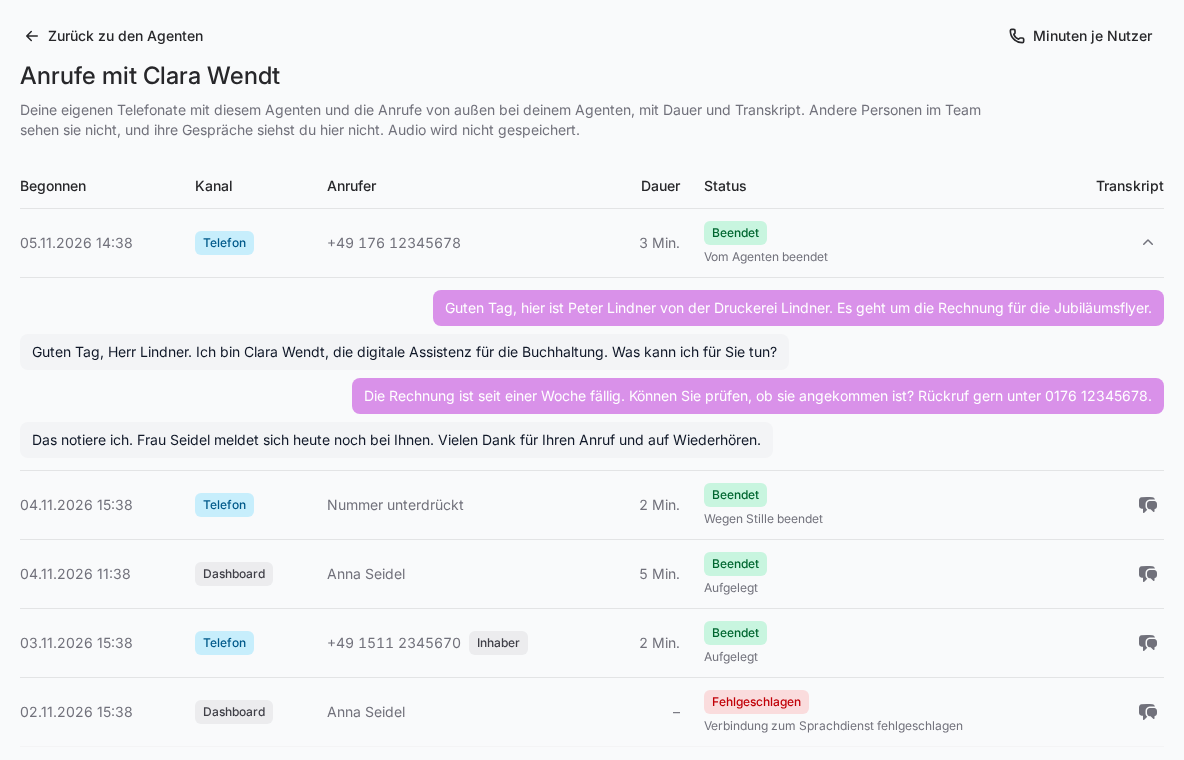
The columns
| Column | What it shows |
|---|---|
| Started | Date and time the call began |
| Channel | Dashboard for a call in the browser, Phone for a call over the phone number |
| Caller | For calls in the browser, the person's name. For calls over the phone number, the caller's number or Number withheld. The Owner label appears when the person who booked the phone number called from one of their stored numbers. |
| Duration | The counted minutes, every started minute in full |
| Status | How the call ended, with the reason below it for ended calls |
| Transcript | The speech bubble icon expands the conversation |
What the status means
- Created and Connecting: The call is being set up.
- On a call: The call is running.
- Ending: The call is being wrapped up.
- Ended: The call is over. The reason is shown below.
- Rejected: The call was not answered, for example because the agent was not ready or the contract is not active. A rejected call counts no minutes.
- Failed: The connection could not be established.
Why a call ended
| Reason | Meaning |
|---|---|
| Hung up | You or the caller hung up. |
| Ended by the agent | The agent said goodbye and hung up. |
| Ended after silence | On a call over the phone number, nobody spoke for a minute. While the agent is still waiting for an answer from its background system, it doesn't hang up because of silence. |
| Maximum duration reached | The call ran for almost two hours and was ended for technical reasons. Just call again. |
| Ended by the voice service | The voice service closed the connection. |
| Connection to the voice service failed or Connection to the agent failed | The connection dropped along the way. Try again. If this happens often, check the agent's status light. |
| Error | Another technical error. Get in touch with us if it happens more often. |
Older calls may still show Budget exhausted. Today calls keep running beyond the minute pool.
Who sees which calls
The call history only shows you what concerns you:
- your own calls with this agent, in the browser or from your stored numbers
- outside calls to your own agents
- as the owner or a co-owner, also outside calls to agents that no team member is assigned to
Other people in the team don't see your calls, and you don't see theirs here, not even as the owner. If an agent moves to another person in the org chart, it takes its outside calls along to that person's list. How the assignment works is explained in Who owns an AI agent?
Recording and transcript
Audio is not stored. There is only the transcript, meaning the written record of what you or the caller and the agent said. Answers the agent delivers only after the call ended are added to the transcript. If it says "There is no transcript for this call.", nothing was said, or the connection was never properly established.
Good to know
- Minute pool: Every answered call counts at least one minute toward your team's minute pool, see Understanding your plan and minute pool.
- No calls yet: The page then says "No calls yet."
- Calling in the browser is explained in Calling your AI agents in the browser.