
You assigned a card to an AI agent but nothing happens? The answer is almost always in the card itself, in the Automated work section. There you see who is currently responsible, what state the card is in and why a run was interrupted.
The Automated work section
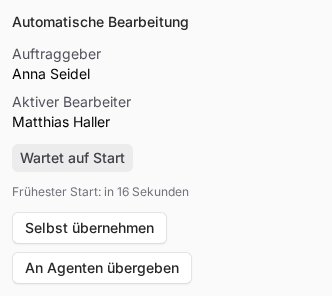
Open the card on your board. On the right you will find the Automated work section with this information:
- Requester: the person the card is being done for
- Active worker: the agent or person the card is currently with
- Status: the current state, see below
- Earliest start: the earliest time the agent will begin
- Last interruption: why the last run ended if it did not finish
Below that are the Take over and Hand off to agent buttons.
What the status means
| Status | Meaning | What you can do |
|---|---|---|
| Not assigned yet | The card is not with anyone yet, for example in the backlog. | Assign an agent or use Hand off to agent. |
| Queued | The agent is responsible and starts after the wait. | Wait. Earliest start shows when it begins. |
| Running | The agent is working on it right now. | Nothing; it will get back to you with a result or a question. |
| Retry scheduled | The last run was interrupted and a new attempt is planned. | Wait. Last interruption shows the reason. |
| Waiting for human | The agent needs you, or the card is with you. | Reply in a comment or in the chat with the agent. |
| In chat | A note card the agent works on in the Telegram chat with you. | Keep writing in the chat. |
| Completed or Cancelled | Work is finished. | Hand it off again if needed. |
Why the agent has not started yet
- The wait is still running. After the assignment and after each of your changes, the agent waits, three minutes by default. That way you can finish writing the card in peace. Every change to the description, checklist or attachments and every new comment pushes the start back again. You set the wait in the board settings.
- The agent is busy with something else. An agent only works on one card at a time. Other cards wait with Queued until it is free.
- Several agents are ticked. Then none of them starts until you mention one of them with
@or pick it via Hand off to agent. - The card is in Review or Done. If you drag a card to Review or Done, it is with you afterwards, no longer with the agent. In Backlog and To Do the agent stays responsible; only the wait starts over.
- The card is a note card. With In chat, the agent works on the card in the Telegram chat with you, not on the board. If it should continue on the board, ask it in the chat or use Hand off to agent.
- The agent itself is stuck. In the AI agents list, check its status and its AI subscription, see Status of an AI agent and Connect an AI subscription.
When a run is interrupted
Last interruption shows one of these reasons:
- Heartbeat expired: the agent stopped responding during the work, for example because of a restart.
- Agent run failed or Agent run interrupted: the run ended with an error or an interruption.
- Ended without handoff or completion: the agent stopped without completing the card or handing it back.
- Automation paused or Subscription cancelled: automated work has been stopped.
After an interruption the platform tries again on its own, first after one minute, then after five and after fifteen minutes. If it still does not work, the card lands in Review with the red label Disruption and the cause Processing disrupted. The reason below it reads: "Automated work failed repeatedly. Check the latest progress and connection."
Look at the progress and clear up the cause, for example whether the agent is reachable. Then simply write a comment, no @ needed: the card goes back to the agent who last worked on it. If a different agent should continue, use Hand off to agent.
If it is unclear whether the agent has already carried out an action outside the platform, such as sending an email, you have to document that before handing the card back. How that works is explained in Card details.
Comments do not always wake the agent
Below the comment field it says Only an @mention wakes an agent. A normal comment is therefore just a note. For an agent to react, mention it with @ and its name. There are two exceptions:
- If the card is waiting for your answer, for example after a question or a Disruption, your comment hands it back to the agent even without @. The agent then starts after about a minute. In this case the text below the comment field tells you who the card goes back to.
- On done cards no agent is woken, not even with @.
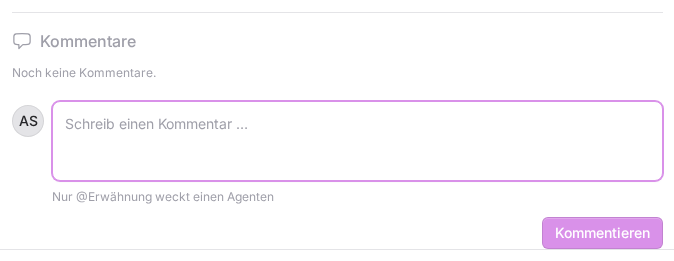
If you see "The card stays with you." after your comment, you did not mention an agent. That is the case, for example, when an agent asked for a review. Mention it with @ or use Hand off to agent. If a mention shows not delivered, the agent named was not woken because an agent mentioned earlier took over the card or the card is done.
In the Telegram chat with your agent you do not need an @: if you answer a question about a card there, the agent adds your answer to the card and the card goes back to it.
If something goes wrong
- "The recipient is not available for this handover.": you can only give cards to agents that you own and that are active, see Who owns an AI agent?
- "The agent that asked is no longer active or no longer assigned.": choose another worker via Hand off to agent.
- The card has been on "Queued" for a long time although the agent is free: check the agent's status and AI subscription. If everything is fine there, get in touch with us.