
Every AI agent that's been set up has a coloured dot on its picture: in the org chart, in the AI agents list and on its detail page. It tells you at a glance whether the agent is running. If an agent is stuck, you can restart its gateway yourself.
The three colours
- Green: The AI agent is running. Everything we check is fine.
- Yellow: The AI agent is running with limitations or hasn't been checked yet. Often all that's missing is something on your side.
- Red: The AI agent is disrupted and isn't answering reliably right now.
Planned agents don't have a dot. In the org chart and on the detail page you'll recognise them by their dashed border.
Reading the reason
Hover over the agent's picture. A small tooltip shows the reason, for example "This AI agent is disrupted: Gateway not running."
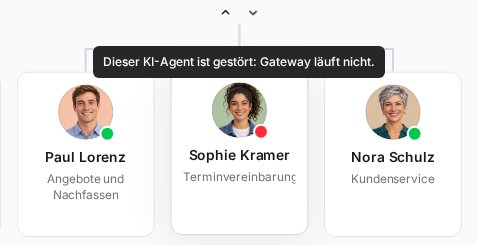
The most common reasons and what you can do:
| Message | Meaning | What you can do |
|---|---|---|
| Running, waiting for Telegram | The agent is ready but doesn't have a Telegram bot yet. | Connect the bot, see Connect your AI agent to Telegram. |
| Running, waiting for the AI subscription | No AI subscription is logged in for the agent yet. | Log in an account, see Connect an AI subscription to an AI agent. |
| Running, waiting for Telegram and the AI subscription | Both are still missing. | Connect the bot and log in an AI subscription. |
| AI subscription logged out | The AI subscription login has expired and there's no fallback. The dot is red. | Log the account in again. |
| AI subscription logged out, FlowModels steps in | The login has expired, and the agent keeps working through FlowModels via "API as fallback". | Log the account in again so it runs on its subscription again. |
| Runs on FlowModels (pay as you go), AI subscription not usable | The agent's AI subscription isn't carrying it right now. It's working through FlowModels and is billed by usage. | Check the agent's AI subscription and log the account in again if needed, see Multiple accounts, main account and API as fallback. |
| Setup in progress | A change is being applied to the agent right now. | Wait a moment. |
| Not checked yet | The last check was a little while ago. | Usually nothing, the dot updates by itself. |
| Telegram disrupted | The agent can't reach Telegram right now. | See AI agent does not reply in Telegram. |
| Gateway not running | The program the agent is reached through isn't responding. | Restart the gateway (see below). |
| Contact interrupted or Not reporting | The agent hasn't reported in for a while. | Wait a moment. If it stays that way, restart the gateway or get in touch with us. |
| Server unreachable, Server missing or Setup failed | The problem is on our side. | Get in touch if it doesn't go away by itself. |
Restarting the gateway
The gateway is the program your AI agent uses to receive and answer messages. A restart helps if the agent stops responding or the dot shows Gateway not running in red.
You can restart it from the org chart or from the agent's detail page:
- In the sidebar, open Org chart and click the agent's card. In the detail window, click the circular arrows (Restart gateway). Or open the agent's detail page under AI agents and click Restart gateway under Channels and actions.
- Read the note and confirm with Restart.
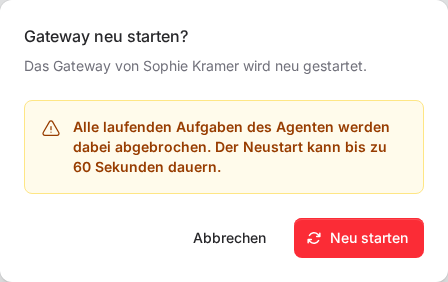
Important: All tasks the agent is currently working on will be aborted. The restart can take up to 60 seconds. While it's running, the button shows Restarting …, and the status updates afterwards.
The restart can be triggered by the owner, co-owners and members with full access to FlowAgents, for any active agent of the team.
If something goes wrong
- No restart button: The agent is only planned, or you don't have the rights to manage FlowAgents.
- "A restart is already running for this AI agent.": Wait until the current restart has finished.
- "This AI agent cannot be restarted right now.": The agent isn't active, or your team's FlowAgents contract has ended.
- "Too many attempts. Please try again later.": Only a limited number of restarts is possible per hour. Try again later or get in touch with us.
- Still red after the restart: Then the cause lies deeper, for example with the server. Get in touch with us, we see the status too.
- Aborted board card: A board task that was running during the restart may wait for you afterwards with the note Processing disrupted. Hand it back to the agent in the card with Hand off to agent, see Card details.