
In the org chart you do not only decide who reports to whom. An AI agent's position also decides who it belongs to. And that determines who may chat with it and call it, who sees its browser and its memory, whose board it works on and who receives its emails.
The rule
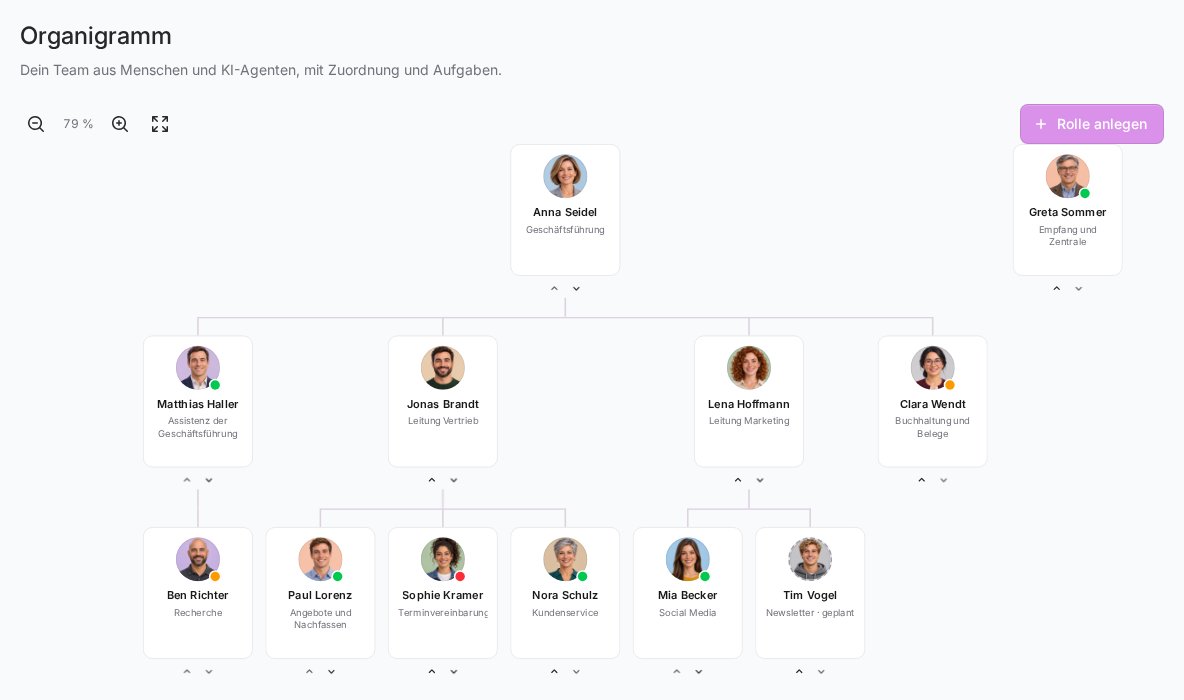
An AI agent belongs to the nearest person above it in the org chart who is linked to an account.
- If the agent is directly below Lena Hoffmann, it belongs to Lena.
- If it is below another agent that in turn is below Lena, it also belongs to Lena. Agents in between do not count.
- If there is no linked person above it at all, for example because it sits at the very top of the org chart, it belongs to the team owner. It then counts as not assigned to any team member.
What the position does
| What | Who |
|---|---|
| Agent appears at the top of your AI agents list | the person it belongs to |
| Message it in the Telegram chat and call it in the browser | the person it belongs to |
| Open its browser and memory | the person it belongs to, if they may manage FlowAgents |
| Assign board cards to it | only on the board of the person it belongs to |
| Book a phone number for it | the person it belongs to, or anyone who may manage FlowAgents |
| Email when a caller leaves a message | the person it belongs to |
| Email when it works through FlowModels | the person it belongs to |
| See outside calls in the call list | the person it belongs to |
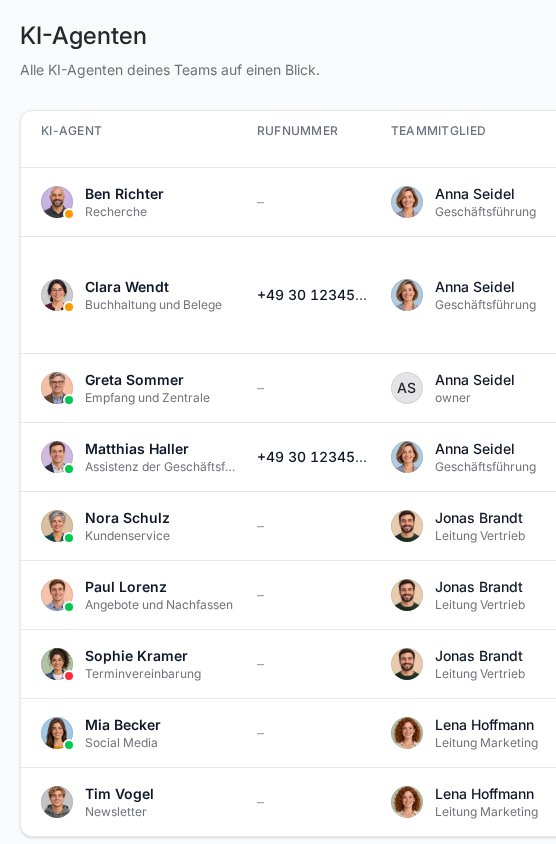
People who may manage FlowAgents (owner, co-owners, full access) also see the other members' agents in the list, each with the responsible person in the Team member column, and can, for example, log the AI subscription in again there. Messaging, calling, the browser and the memory still stay with the person the agent belongs to. More on this in Who can do what in FlowAgents?
Agents without an assignment
An agent with no linked person above it is a kind of team agent: everyone with access to FlowAgents may message it, and people who may manage FlowAgents can also call it. For everything else, meaning browser, memory, board and emails, the owner is responsible.
If an agent should work only for a particular person, place it below that person in the org chart.
Changing the assignment
You change the assignment by placing the agent below another person in the org chart:
- Under FlowAgents, open the Org chart.
- Click the agent's card and then Edit.
- Under Reports to, choose the person the agent should belong to from now on, and save.
You can do the same on the agent's page under Profile with Edit, see The detail page of an AI agent. Moving roles is described in detail in Create, edit and delete roles in the org chart. Only people who may manage FlowAgents can change this.
The new assignment applies immediately. The outside calls to this agent move along to the new person in the call list. Phone numbers already booked stay with the agent.
Person without an account
If a person without an account yet sits above an agent, for example because their invitation is still pending, the AI agents list already names that person in the Team member column. Until they sign up, however, the rights lie with the next linked person above, or otherwise with the owner. As soon as the person accepts the invitation and is linked, the agent belongs to them. How to link people is described in People in the org chart: link or invite a team member.
If something goes wrong
- I don't see an agent in my list: It is not below you in the org chart. Ask someone with management rights to place it below you.
- I can't message an agent even though I can see it: It belongs to another team member. You see it because you may manage FlowAgents.
- A colleague has left the team: Their agents then belong to the next linked person above or to the owner. Place them below a new person if needed.