
Did you get an email with the subject “Your AI agent … is working through FlowModels”? Then one of your agents is currently not running on its AI subscription but on FlowModels. It keeps working as usual, but during this time its requests are billed by usage (pay as you go). A new login brings it back to its subscription.
FlowModels used to be called FlowAI API. If you have an older email with that name, everything here applies just the same.
What the email means
The email tells you since when the agent has been sending its requests through FlowModels, which AI subscription it normally uses (ChatGPT, for example), how many requests have gone this way so far and when the last one was.
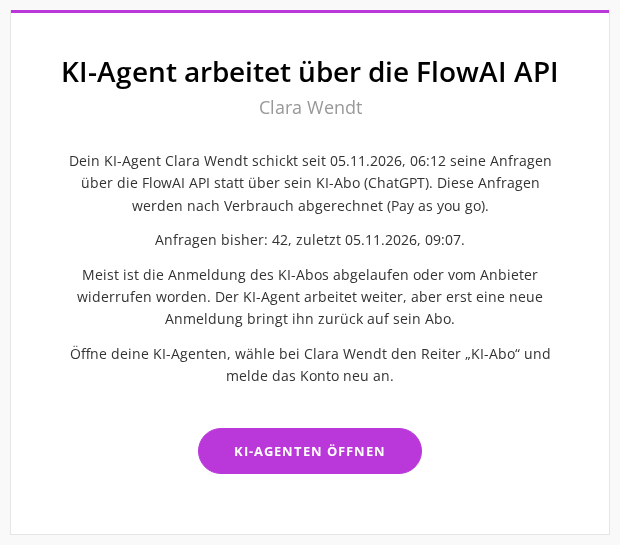
Usually the login to the AI subscription has expired or was revoked by the provider, for example because the password of the ChatGPT account was changed. Because API as fallback is switched on for your team, FlowModels steps in and the agent stays available. Without this switch it would stop answering.
How to bring the agent back to its subscription
- Click Open AI agents in the email, or open AI agents under FlowAgents in the sidebar.
- Find the agent named in the email. In the AI subscription column it usually shows a red Logged out.
- Click Log in again right there. Alternatively, open AI subscription from the three dots (Manage).
- Log the account in again as described in Connect an AI subscription to an AI agent.
As soon as the login is complete, the agent works through its subscription again. Anyone who may manage FlowAgents can log an agent in, that is owners, co-owners and people with full access, even for agents of other team members.
How to tell that the fallback is running
At the top of the agent's AI subscription window you see the notice The AI agent is working through FlowModels, with the start time and the last request. In the Accounts in use list, the FlowModels row then carries the labels Pay as you go and In use right now.
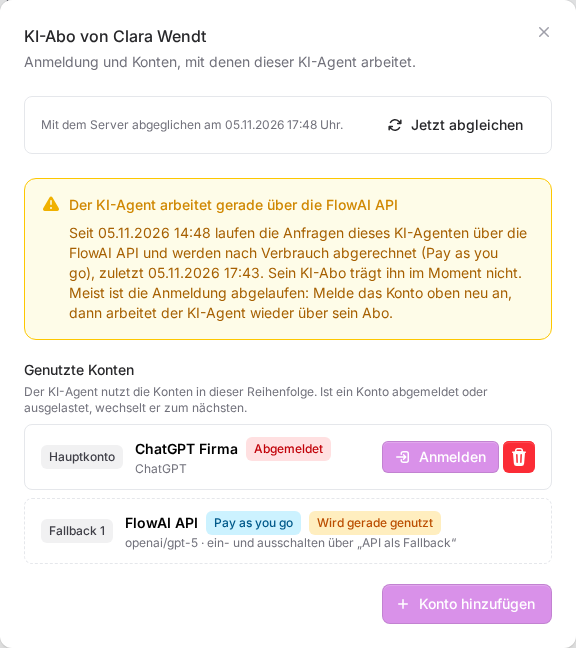
Once the last request through FlowModels is more than half an hour ago, the notice disappears. Instead, the FlowModels row shows for one more week when it was last used, from when to when.
The status light shows this too: while the fallback is running it is yellow with the reason Runs on FlowModels (pay as you go), AI subscription not usable. More on this in Status of an AI agent.
What it costs
Requests through FlowModels are billed by usage, from your team's FlowModels credit. You can see exactly what was charged in the FlowModels dashboard, see Analyse and export usage. How to add credit is explained in Top up credit. You can also reach the dashboard through the info icon next to API as fallback and Go to the FlowModels dashboard.
The sooner you log the subscription in again, the less you pay through FlowModels.
When the email is sent
- It only arrives once the agent has worked through FlowModels for at least an hour and with at least five requests. A short interruption does not trigger an email.
- It goes to the person the agent belongs to in the org chart. If no linked person stands above the agent, the team owner gets it. How this assignment works is explained in Who owns an AI agent? We are notified as well.
- The email is written in the language the person has set in their profile.
- It is sent only once per phase. If the agent has not worked through FlowModels for more than six hours and the fallback then steps in again, that counts as a new phase and you get another email.
Good to know
- Switching the fallback off: If you do not want any costs through FlowModels, switch off API as fallback at the top right of the AI agents page. An agent with a logged-out subscription then stops working entirely until you log it in again. More in Multiple accounts, main account and API as fallback.
- Model for the fallback: The gear icon next to the switch (Choose model) sets which model the agents use during the fallback.
- A second account as backup: If you add another account for the agent, it switches there first when the main account fails, before FlowModels steps in.
If something goes wrong
- No “Logged out” in the list, but you still got the email: Open the AI subscription window anyway. Sometimes only one particular account is affected, or an account shows Logged in, limit reached or Logged in, quota used up. Then the subscription cannot carry the agent at the moment. Get in touch if everything looks logged in and the notice stays.
- The login does not work: Check that your subscription with the provider is still active. Grok requires SuperGrok or Premium+.
- No “Log in again” button: You are not allowed to manage FlowAgents. Ask the owner or a co-owner to log the account in again.