
The Telegram chat is the most direct line to your AI agent. You write to it there as you would to a colleague, give tasks by text or voice message, and it gets back to you in the same chat with questions, progress updates and results, including for cards on your board. Here is how it all fits together.
Requirements
For your agent to send you questions and results about board cards in the chat, three things are needed:
- The agent has a bot of its own. How to connect it is explained in Connect your AI agent to Telegram.
- Your account is linked with Telegram, and with the same Telegram account you use to write to the agent. This works as described in Connect FlowAI with Telegram (German).
- You have written to the agent yourself at least once. Only then is there a chat in which it can get in touch. A short message such as "Hello" is enough.
If any of this is missing, the normal conversation still works. You then see questions about cards on the board and receive them by email, and the result of a finished card by email as well.
Give tasks by chat
Just tell your agent what it should do: "Please summarize the open quotes for me by tomorrow." It takes care of small things right in the conversation. For bigger tasks it can create a card on your board from your message. The card then shows the agent under Created by and below that On behalf of with your name and via Telegram.
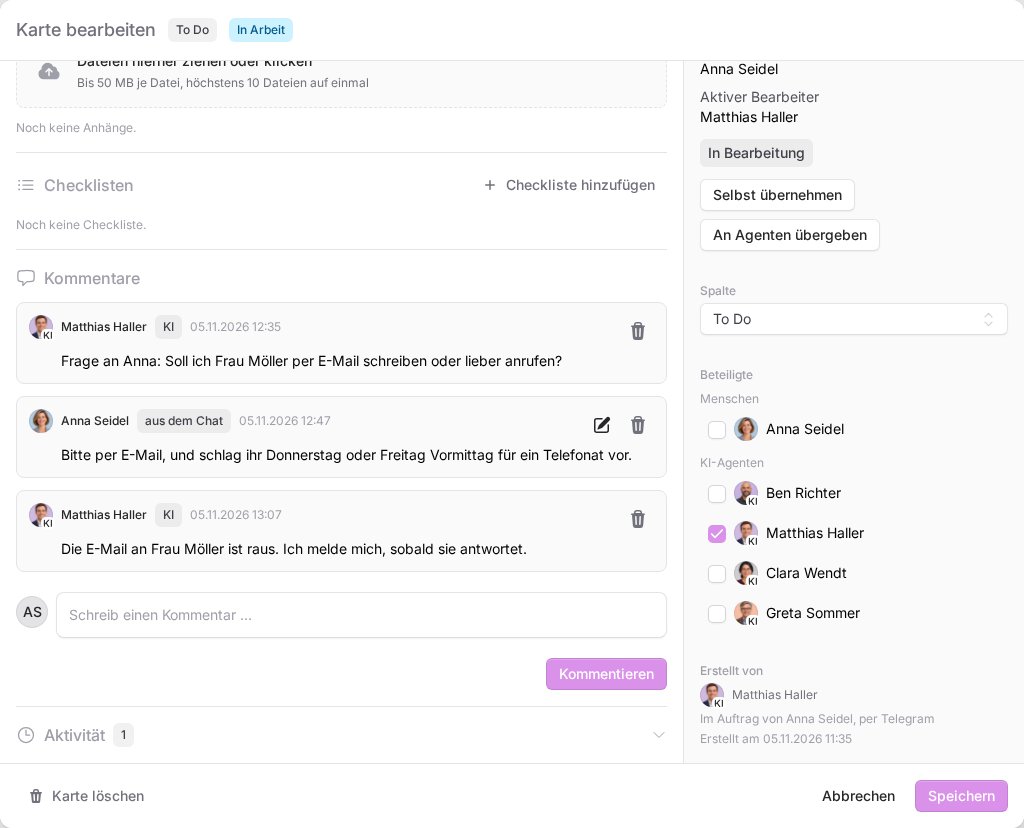
The agent creates some cards as note cards. A note card is a kind of reminder for longer tasks that it keeps working on with you in the chat. Such cards show the status In chat under Automated work. If you would rather have the board or another agent take over the task, just tell it.
Questions and results in the chat
When your agent is working on a card from your board and needs something from you, it gets in touch in your chat with it, in its own words, as part of the ongoing conversation. This applies to:
- questions, for example "Should the quote come from you or from Jonas?"
- requests to review or approve a result
- progress updates on longer tasks
- the result, once it has finished a card
- cards another agent has handed over to it
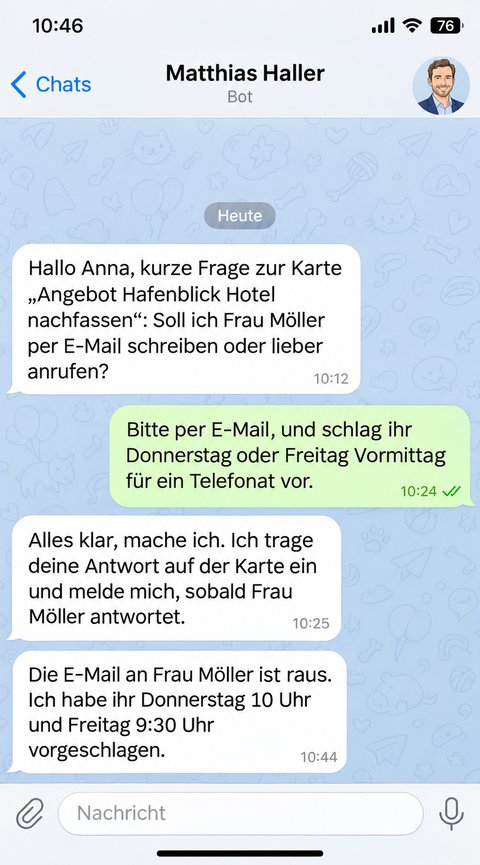
You simply reply in the chat. The agent adds your answer to the card and carries on. On the card your answer appears as a comment marked from the chat. So what you write in the chat counts just like a comment on the card, including as an approval. An approval has to come after the question: an earlier "yes" does not answer a later question.
You can also reply with a voice message. The platform then transcribes it itself. This works for recordings of up to ten minutes and up to 30 voice messages per hour. If a recording is longer, it is better to type your answer.
Good to know
- Message that briefly flashes up: before your message becomes an answer on a card or a new card, the platform checks with Telegram that it really comes from you. A forwarded copy of your message may appear in the chat for a moment and then disappear again.
- Only your board: only the person who owns the board can answer and approve on a card. So from the chat the agent only accepts your own cards.
- Language of voice messages: voice messages are transcribed in the language set for the agent, usually German. If you would rather speak another language with it, get in touch with us.
- Notification settings: in the Board settings under My notifications you turn Telegram and Report finished cards on or off, see Board settings, notifications and archive. If Telegram is off, the agent does not get in touch about cards in the chat.
- Old notices: if the agent cannot get a notice into the chat within a day, for example because it was disrupted, the notice no longer arrives there. You then receive a result by email, and a question stays on the card.
If something goes wrong
- The agent says "Link Telegram to an authorized team account.": the agent could not match you to an account with board access. Link your account with Telegram, using exactly the Telegram account you are writing from.
- Questions arrive by email instead of in the chat: one of the three requirements above is missing, or Telegram is turned off in your notifications. Usually you have never written to the agent yourself.
- The agent does not reply at all: read Your AI agent does not reply in Telegram.
- Your message did not become a card: ask the agent for it explicitly or create the card yourself on your board, see The board: assign tasks to AI agents.