
Was your company's verification for phone numbers rejected? That is annoying, but almost always quick to fix. The review gives a reason for every proof it flags, and everything you entered so far is kept. So you only correct what was flagged and submit again.
How to tell it was rejected
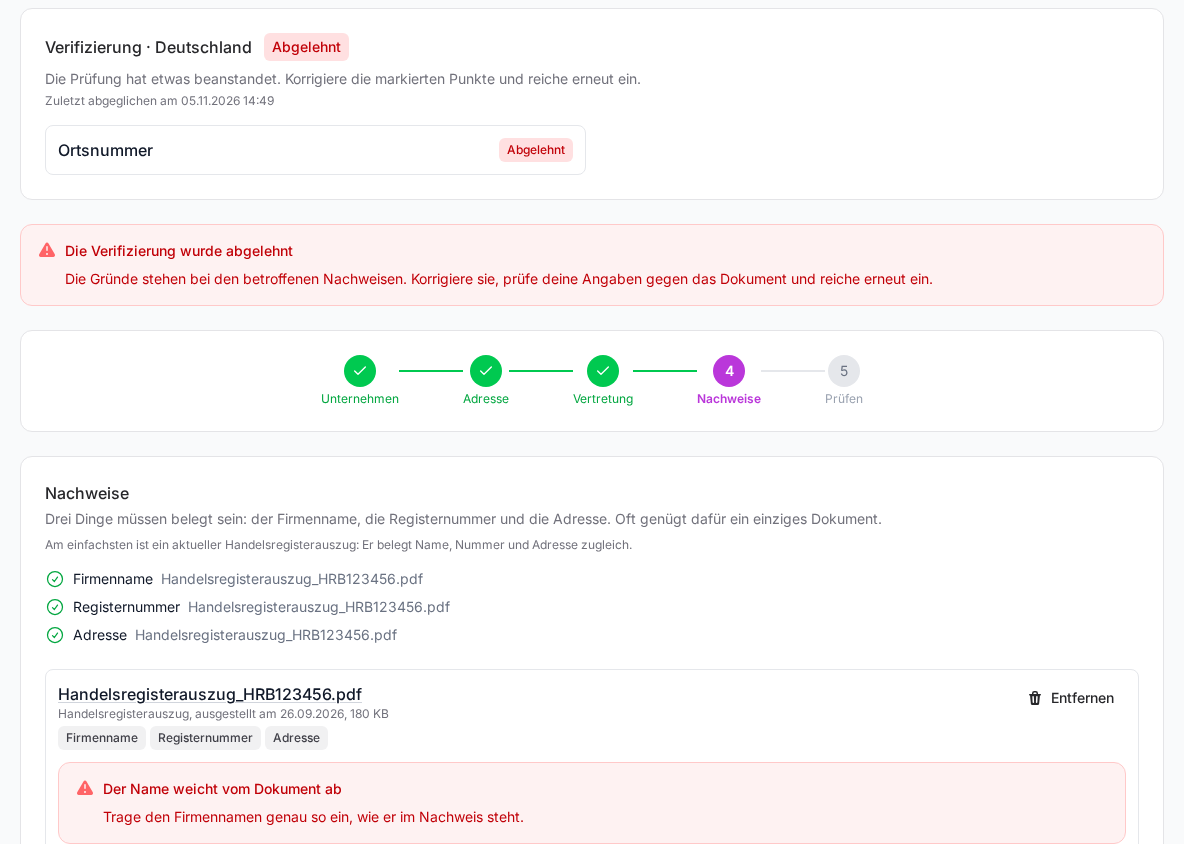
- You get an e-mail with the subject "Your verification needs a correction". It goes to the person who submitted and to the owner of the team.
- Verification rejected appears in your notifications.
- In the Verification tab the country shows the Rejected label and a Correct button.

How to correct it
- In the sidebar under FlowAgents, open Telephony and go to the Verification tab.
- Click Correct next to the country. The top shows the note The verification was rejected.
- Go to the Proofs step. Below the flagged document you see in red what didn't fit, with a hint on what to do.
- Correct the details in the Company, Address or Representative steps, or remove the document with Remove and upload a fitting proof.
- Check everything once more in the Review step and click Submit for review.
The new review again usually takes up to three business days. How the verification works in general is explained in Verifying your company for phone numbers.
The reasons and what you can do
| Reason | What you can do |
|---|---|
| The document is not legible | Upload a scan or photo on which all details are clearly visible. |
| The document has expired or carries no date | Upload a valid document with a visible date. |
| The document is too old | Get a current excerpt or notice and upload it. The platform already warns you when you upload a document that is a year old or more. |
| Details in the document are redacted | Upload the document complete and without redactions. |
| The authorised representative is not shown in the document | In the Representative step, enter a person named in the proof, for example the managing director listed in the commercial register, or upload a document that names them. |
| The proof of registration is missing | Upload a commercial register excerpt or the tax office notice. |
| A post office box is not accepted | Enter the full street address and prove it with a document. |
| The address is incomplete | Enter street, house number, postal code and place in full. |
| The document shows no address in the local network | Upload a proof that shows the seat in the local network of the area code you want. |
| The address differs from the document | Write the address exactly as it appears in the proof, including abbreviations such as "Str.". |
| The name differs from the document | Write the company name exactly as in the proof, with its legal form, such as "GmbH". |
| The details do not match the document | Compare name, number and address with the proof and correct the difference. |
| Details are missing | Go through the steps once more and fill in all fields. |
| The document is not accepted for this proof | Upload one of the named documents: commercial register excerpt, trade licence or tax office notice. |
| The requirements have changed | Check your details, upload a current proof if needed and submit again. |
| A letter of authorisation is required | Get in touch with us, we will help you with the letter. |
If it says "The proof was rejected without further detail." or shows an English sentence that is not in this table, the reason came from the telephony provider without a match. In that case check above all whether name and address match the document exactly. If that doesn't help, get in touch with us.
If the details come back before the review
Sometimes a detail already fails the pre-check, before the actual review starts. The verification is then back at Draft, and the status card shows "Detail missing or not matching" in red with the field concerned. Correct the field and submit again.
If the verification needs an update
The e-mail "Your verification needs an update by …" is something different. Nothing was rejected; the requirements for German phone numbers have changed. Your phone numbers keep running unchanged until the stated deadline. If you don't update the verification by then, you can't book any further phone numbers afterwards. In the Verification tab the country then shows Update needed, and once you open it, the note Your verification needs an update. Click Correct, check your details, replace proofs that no longer suffice and submit again. During the new review it shows Update in review.
Good to know
- Who corrects it: The verification is edited by the owner and the co-owners, see Who can do what in FlowAgents?
- Booking phone numbers is only possible once the verification is approved. You then get an e-mail with the subject "Your company is verified for phone numbers", see Booking a phone number for an AI agent.
- Company e-mail: An address on your own company domain for the authorised representative leads to rejections less often than a free mail address.