
Every AI agent gets its own bot in Telegram. You write to the agent through this bot, and it replies to you there. You create the bot yourself with BotFather, Telegram's official tool for bots. At the end you receive a bot token, which you then add to your agent.
Before you start
- You need a Telegram account, see Create a Telegram account and username.
- Create a separate bot for each agent. A bot that already runs for something else cannot be connected.
- Think of a name beforehand, for example the agent's name.
Create the bot
- Open @BotFather in Telegram. Look for the blue check mark next to the name, there are imitators.
- Tap Start or send /start.
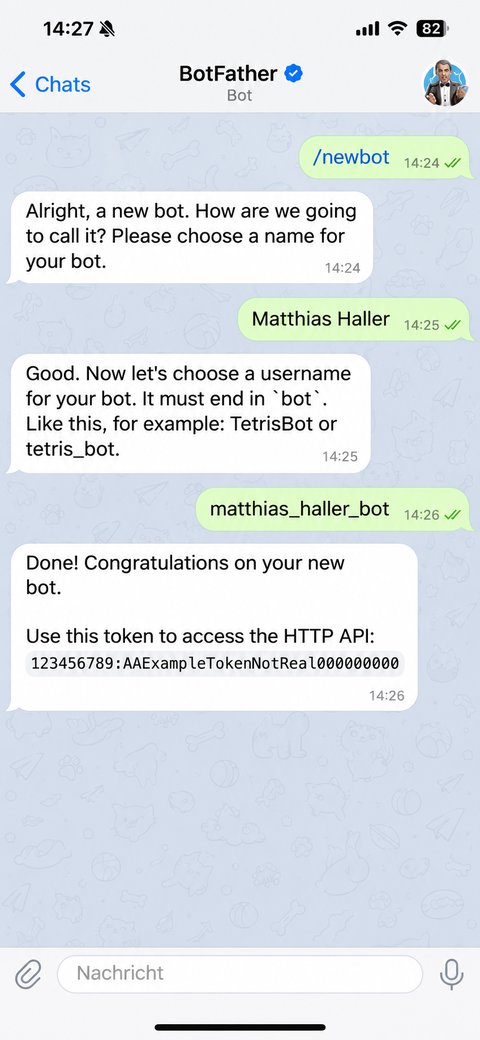
- Send /newbot.
- BotFather asks for the bot's name. This is the display name shown at the top of the chat, for example Matthias Haller. Spaces and special characters are allowed.
- Then BotFather asks for the username. It must end in bot, for example matthias_haller_bot or MatthiasHallerBot, and may have 5 to 32 letters, digits or underscores. If the name is taken, try a variation.
- BotFather confirms the new bot and sends you a message with the token. It appears below "Use this token to access the HTTP API" and looks roughly like this: 123456789:AAH4kq…
Copy the token
- Tap the token in the message, and Telegram copies it to the clipboard.
- Copy it completely, with the digits before the colon and everything after it.
- Paste it straight in for your agent as described in Connect your AI agent to Telegram.
Protect the token
The token is like a password: anyone who knows it can control the bot.
- Do not forward the token by email or chat, and do not keep it in shared documents.
- We will never ask you for the token by email or phone. You only enter it yourself in the Connect Telegram dialog.
- Do not enter the token anywhere else, for example in another chat tool. A bot can only be used by one program at a time.
- If the token has fallen into the wrong hands, send BotFather /revoke or /token, pick the bot and get a new token. The old one stops working immediately. If the bot is already connected to your agent, you cannot swap in the new token yourself: get in touch with us, and we will agree with you on a safe way to pass it on.
Optional: picture and description
- /setuserpic sets a profile picture for the bot, for example your agent's picture.
- /setdescription sets the text people see before they start the bot for the first time.
You can change these details at any time, the connection to the agent is not affected.