
Some questions you ask your AI agent again and again: What do our most important customers prefer? How do quotes work here? That is what mental models are for. A mental model is a summary that the agent's memory keeps current for a fixed source question. When answering, the agent prefers to use it instead of gathering all the individual memories every time.
Where to find them
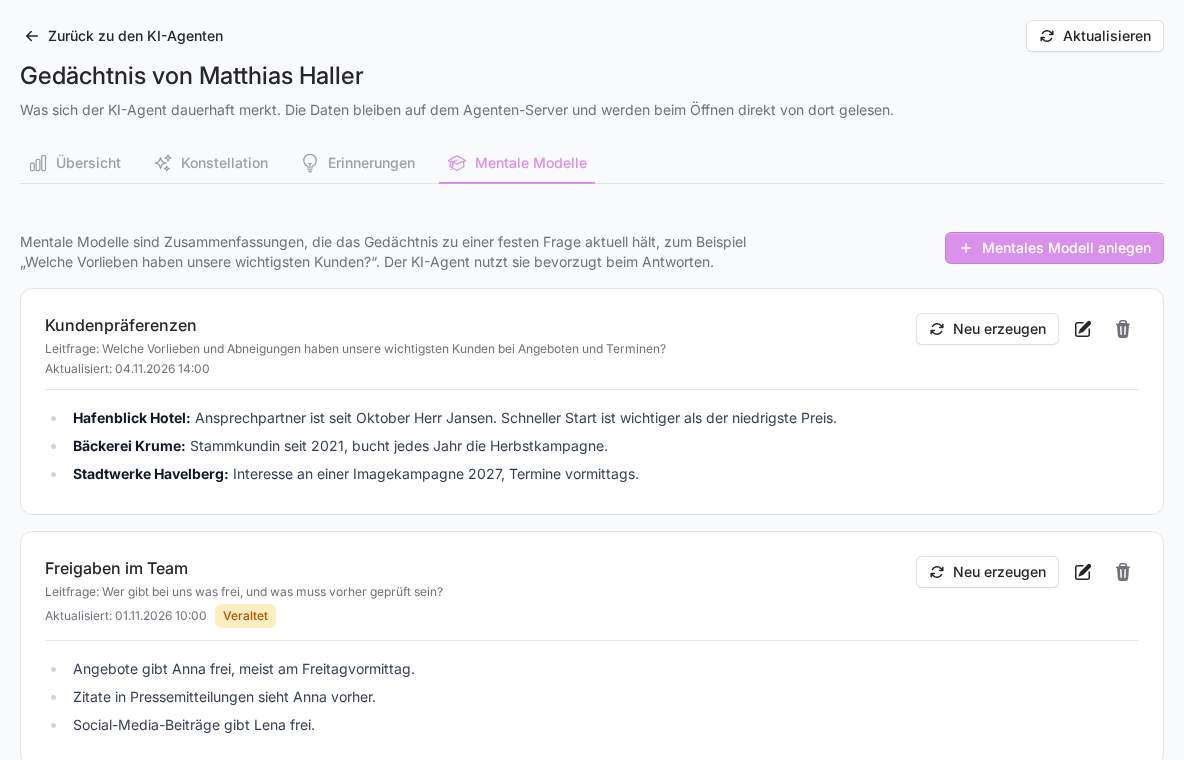
- Open the agent's memory: under FlowAgents, AI agents via the light bulb (Memories) in its row, or via the Memories button on its detail page. Both ways are described in Your AI agent's memory.
- Switch to the Mental models tab.
Each model has its own card with its name, source question and the generated content below.
Creating a mental model
- Click Create mental model.
- Enter a short Name, for example "Customer preferences". It can be up to 120 characters long.
- Write the Source question the model should keep answering, for example "What do our five largest customers like and dislike about quotes and appointments?"
- Click Save.
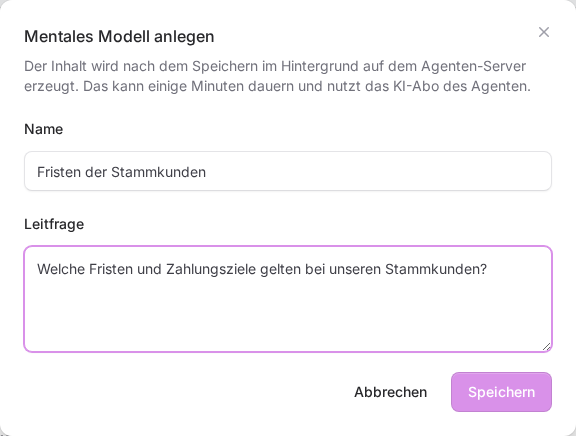
The content is then generated in the background on the agent's server. This can take a few minutes. Until it is ready, the card shows the label Being generated. Once the content is there, it shows Updated with the date and time. Reload the page with Refresh at the top right if needed.
Good source questions
A source question works best when it asks exactly one thing and can be answered from what the agent has actually experienced.
- Good: "Which deadlines and payment terms apply to our regular customers?"
- Good: "How does Anna approve quotes, and what has to be checked first?"
- Less good: "What do you know?" That is too broad, and the summary ends up vague.
The source question must be at least 3 and at most 2,000 characters long.
Updating, changing and deleting
- Regenerate: runs the source question against the memory again and replaces the content. Worth doing when a lot has been added since the last update.
- Outdated: This label appears when the content no longer matches the current memory. Click Regenerate then.
- Pencil (Edit mental model): changes the name and source question.
- Bin (Delete mental model): removes the model and its content from the memory. The memories themselves stay.
Good to know
- Who can do this: You create mental models only for your own agents, and only if you may manage FlowAgents.
- What it is based on: A model summarises what is in the memory. If something there is wrong, correct the memory first, see Correct wrong or confidential memories, and then regenerate the model.
If something goes wrong
- "Please enter a name of at most 120 characters." or "Please enter a source question of 3 to 2000 characters.": Shorten or complete your entry.
- The model stays on "Being generated" for a long time: Click Refresh at the top. If nothing changes after a quarter of an hour, get in touch with us.
- "The agent server cannot be reached right now": Try again later.