
Your AI agents run on servers of their own that we set up and look after for your team. Under FlowAgents and Servers you can see which servers these are, how they are equipped, how many agents run on them and whether everything is fine. As the owner you also see how each server is included in your contract.
The server list
Each server has a row of its own. Your team's most important server carries the blue Primary label and is listed first.
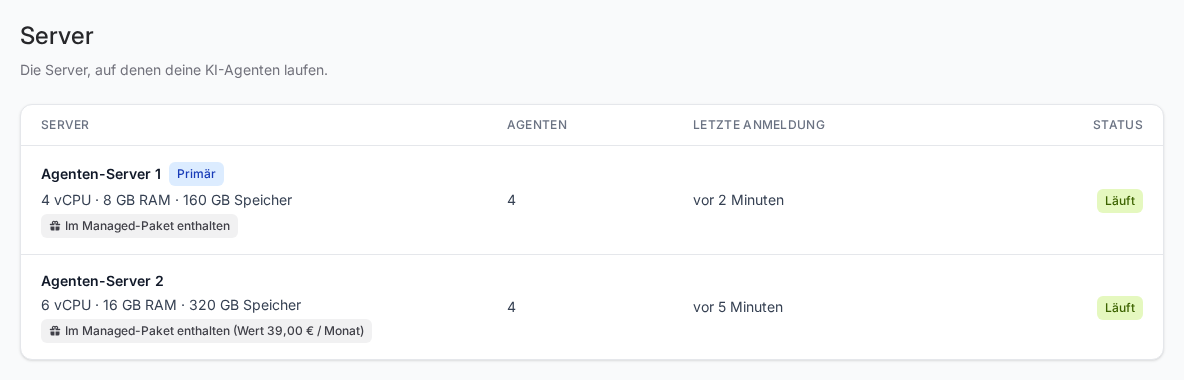
| Column | What it shows |
|---|---|
| Server | The server's name and its specs, for example “4 vCPU · 8 GB RAM · 160 GB storage” |
| Agents | How many AI agents are assigned to the server |
| Last login | When the platform last logged in to the server successfully. Hover over it to see the date and time. None yet means it has never worked. |
| Status | The state of the server |
What the status means
For most servers the platform reads the state directly from the data centre. You then see one of these values:
- Running: The server is in operation.
- Stopped: The server is switched off. Agents running on it do not answer.
- In progress: The server is being set up, reinstalled or changed.
- Under maintenance: We are working on the server.
- Disruption: An error has occurred on the server.
- Unknown: The state could not be determined yet.
Individually managed servers
We manage some servers individually, for example when a server does not run with our hosting provider. For these servers there is no information from the data centre. The status then follows the Last login column:
- Running: The platform logged in without errors within the last 15 minutes.
- Unreachable: The last successful login is more than 15 minutes ago, or the last login attempt returned an error.
- Unknown: The platform has never logged in.
Nothing changes for you: we set up and look after these servers too.
If Disruption, Unreachable or Stopped shows for a longer time without us having told you beforehand, get in touch with us. Whether individual agents are running is also shown by their status light, see Status of an AI agent.
Billing: what the owner sees
Only the team owner sees below the server name what already covers the server. You never pay extra for your servers. What it shows depends on your package, which you can see under Plan:
- With Managed: We look after your AI agents and servers, and the servers are included in the package. The server then shows Included in the Managed package, often with its value in brackets. You do not pay this value on top.
- Without Managed: You pay one licence per active AI agent, and it covers servers, operation and maintenance. The server then shows Included in the agent licence, with no amount and no due date.
This applies as long as your FlowAgents contract runs. When the contract ends, the servers end too, see When your FlowAgents contract ends.
Co-owners and members see the server list without this information. What your whole package costs per month is shown under Plan, see Understanding your plan and the minute pool.
What you can do yourself and what we do
The page is view-only. We create, restart, upgrade or remove servers for you. Just write to us with what you need, for example when another agent is to be added and the server needs more power for it.
If only a single agent is stuck, you do not need to have the whole server restarted. Often Restart gateway is enough. Owners, co-owners and people with full access can trigger this themselves, in the org chart or on the agent's page under Channels and actions.
Good to know
- Servers and the end of the contract: Your servers run as long as your FlowAgents contract runs and end with it, whether it is cancelled with immediate effect or for a later date. You cannot keep them running beyond the end of the contract, and nothing is charged for them afterwards.
- Who sees the list: Everyone with access to FlowAgents. Only the team owner sees the billing information.
If something goes wrong
- “No server has been set up for your team yet.” Setup is still in progress. We will let you know as soon as the server is ready.
- You are a co-owner and see no billing information: That is intended. Only the team owner sees the billing information.
- An individually managed server shows “Unreachable”: Short interruptions can happen, for example during maintenance. If the status stays, get in touch with us.