
Every Telegram account has a unique number, the Telegram ID. It never changes, even if you change your name or username. Your AI agent uses it to recognize who is allowed to write to it: it does not answer messages from other accounts.
The easiest way: automatically through your bot
When you connect your agent, you usually do not need to know the ID at all.
- If the ID is already known, for example because the person has already linked their account with Telegram, the dialog shows This Telegram ID is already on file. with the last digits for checking.
- If it is missing, the dialog shows a QR code and the button Open the bot in Telegram:
- Open the bot on the phone of the person the agent belongs to, using the QR code or the button.
- Tap Start in Telegram.
- The platform takes over the ID automatically and shows Found: with the first name for checking.
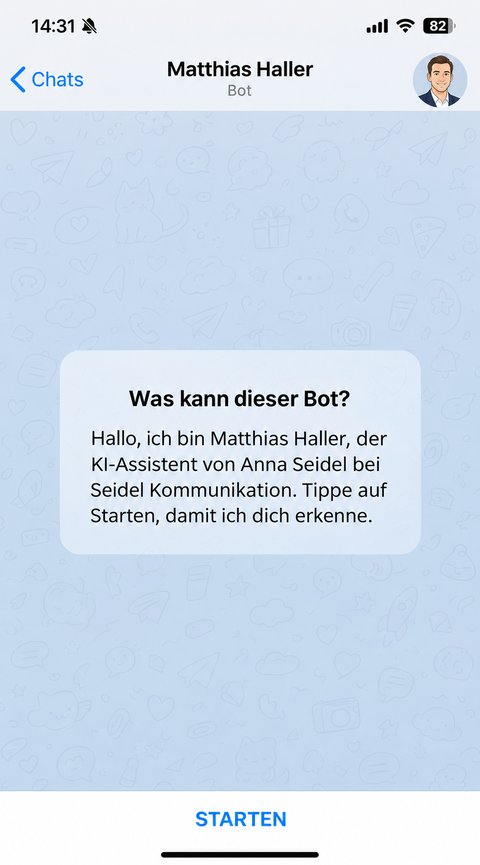
The whole process is described in Connect your AI agent to Telegram.
Find the ID by hand
The Telegram app does not show the ID in your profile. If you still want to enter it yourself with Enter the ID yourself, there are two ways.
With an info bot
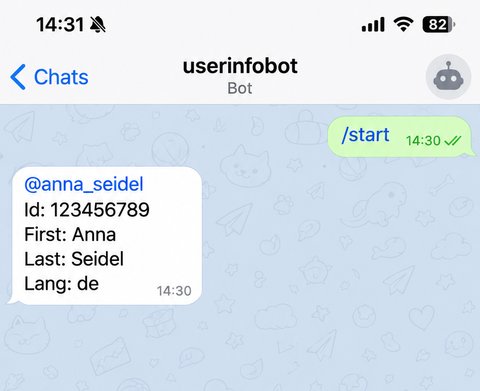
- Open an info bot in Telegram, such as @userinfobot. Bots like this do not belong to us, they only reply with your account details.
- Tap Start.
- The bot replies with your ID, for example Id: 123456789. Copy only the digits.
With Telegram Desktop
- In Telegram Desktop, open Settings, then Advanced and Experimental settings.
- Turn on Show Peer IDs in Profile.
- Your profile now shows the ID.
Good to know
- The ID consists of digits only, usually 9 to 10 of them. The dialog accepts 5 to 15 digits. A minus sign in front belongs to groups and channels, not to people.
- If an ID is already on file for the person, you cannot enter a different one. The dialog then says "A different Telegram ID is already on file for this person. Only our support can enter another one."
- The ID is not a secret like a password, but it does reveal which account is yours. Only enter it where it is needed.